BareSQL Audit
BareSQL Audit logs in to a PostgreSQL database and works out, for every login, each column it can read and the route that gets it there. It marks the columns that hold personal data and adds findings for the setups that usually end in a leak. It supports PostgreSQL 13 to 18.
baresql audit "postgres://auditor@db.example.com/shop?sslmode=verify-full"
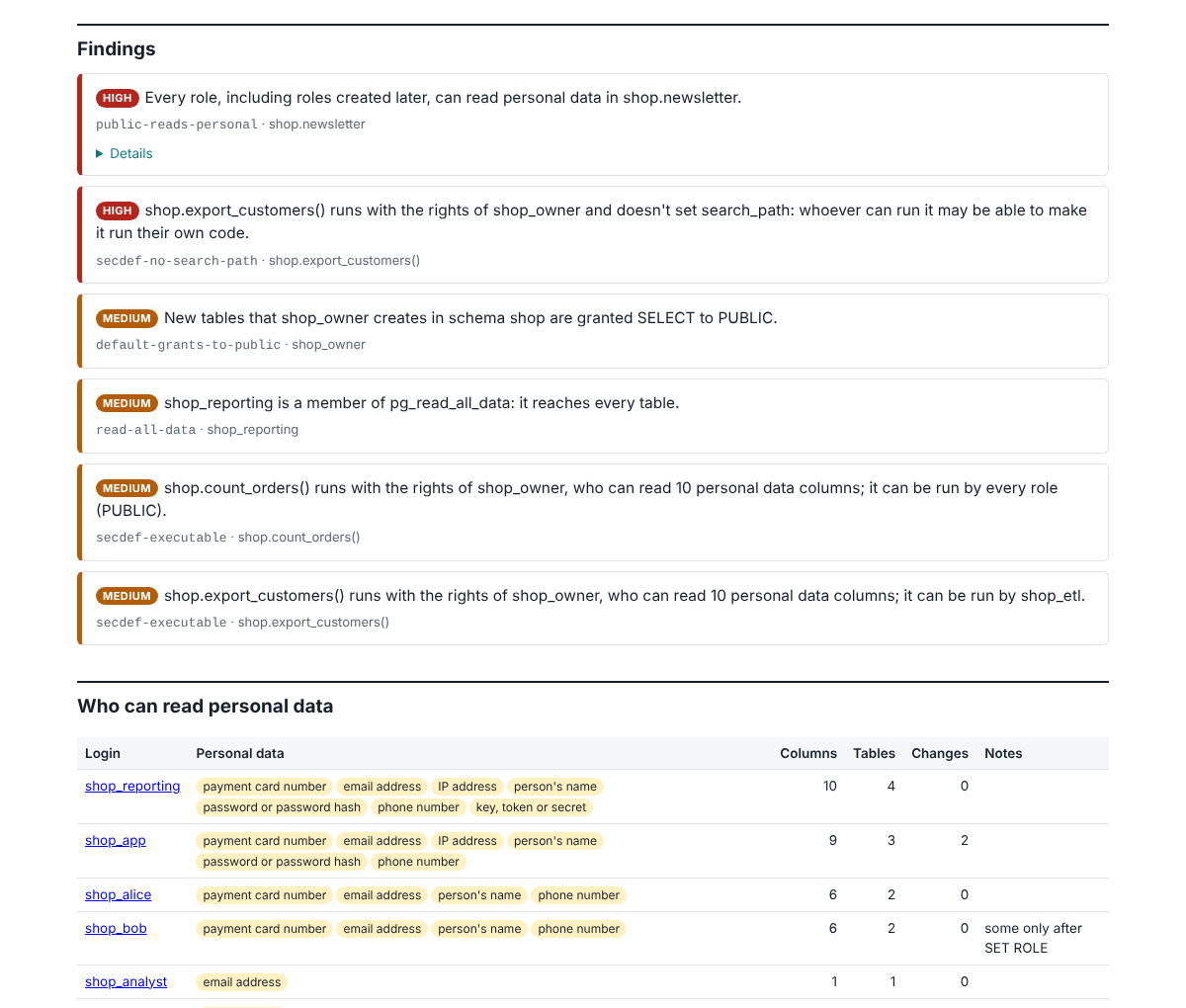
The audit prints a summary and writes two files. report.html is a page to read and share, and audit.json holds the same facts for scripts and for comparing with the next audit. This is the summary for the sample shop database the tests build:
BareSQL Audit of baresql_fx_shop (PostgreSQL 16.15 (Ubuntu 16.15-0ubuntu0.24.04.1)) as postgres
7 logins, 7 of them can read personal data; 10 columns hold personal data.
Findings: 2 high, 4 medium, 0 low
  high   public-reads-personal        shop.newsletter
  high   secdef-no-search-path        shop.export_customers()
  medium default-grants-to-public     shop_owner
  medium read-all-data                shop_reporting
  medium secdef-executable            shop.count_orders()
  medium secdef-executable            shop.export_customers()
Wrote baresql-report/report.html and baresql-report/audit.json
What the Report Shows
The report starts with the findings, the most serious first. Then comes a table of the logins that can read personal data, with the kinds of data each one reaches, and a list of every column that holds personal data, with the evidence and the logins that read it. Each login then gets a section of its own: the personal data it can read and the route to each column, the other columns it can read, the tables it can change and the security-definer functions it may run. The sample reports show four databases in full.
Routes
A route is how a login reaches a column. Access often arrives by a route nobody had in mind, so the audit follows these routes:
- grants to the login, to a role it belongs to at any depth, and to PUBLIC;
- ownership of the table;
- superuser and
pg_read_all_data; - roles the login can switch to with SET ROLE without inheriting them;
- views that read tables with their owner’s rights, and views with
security_invokerthat read them with the reader’s; - partitioned tables and parent tables, which return their children’s rows.
Here are four lines from the shop’s audit, as --format lines prints them:
read PUBLIC shop.newsletter.email [email] granted to PUBLIC
read shop_bob shop.customers.email [email] after SET ROLE shop_support_team: through view support.customer_lookup (rights of shop_owner)
read shop_reporting shop.customers.email [email] member of pg_read_all_data
read shop_reporting shop.customers.email [email] through view support.customer_lookup (rights of shop_owner)
The first says that every role can read the newsletter’s subscribers, including roles nobody has created yet. shop_bob belongs to the support team without inheriting its rights, so the customers’ email addresses become his after SET ROLE shop_support_team, through a view that reads the table with its owner’s rights. shop_reporting reaches the same column twice: as a member of pg_read_all_data and through the same view.
Each route also says what row security lets through on it: all rows, the rows a named policy allows, or none. When a view’s query reads a column that the rights it runs with don’t cover, PostgreSQL refuses every query on the view, and the audit marks that route as one that fails. A grant in a schema the login can’t use shows as the statistics it still gives away through pg_stats, and a login that can’t connect to the database is marked as such.
The audit computes every route from the system catalogs, then asks the server’s own privilege functions whether the login really has the access. When the two disagree the server wins, and the finding unexplained-access lists the places. A gap in BareSQL’s reasoning then shows in the report itself.
Personal Data
A column counts as personal data when its name or its values say so. Names are split into words (customerEmail2 reads as customer, email, 2) and matched in English and the common European languages, with accents folded. Values are checked with real tests where they exist: card numbers must pass the Luhn check and start like a card issuer’s, IBANs must pass their mod-97 check, and JSON documents are read key by key.
By default the audit reads up to 200 rows of each table. What it reads stays in memory. The report says which kind of data a column holds and how BareSQL knows (“40 of 40 sampled values are payment card numbers (valid check digit)”), and never shows a value. --no-sample turns sampling off, and the audit then goes by column names alone.
Findings
Each finding has a severity and a code that never changes, and names the login, table or function it is about.
| Code | Severity | What it means |
|---|---|---|
public-reads-personal |
high | every role, including roles created later, can read personal data in a table |
superuser-login |
medium | a login is a superuser |
set-role-superuser |
high | a login can SET ROLE to a superuser |
read-all-data |
medium | a login is a member of pg_read_all_data or pg_write_all_data, or can SET ROLE to one |
createrole-escalation |
high | a login has CREATEROLE before PostgreSQL 16, where it can grant itself any role but superuser |
see-all-queries |
low | a login can read the text of every session’s queries |
server-file-access |
high | a login can read or write files, or run programs, on the database server |
grant-option-personal |
medium | a login may grant read access to personal data to others |
admin-option |
medium | a login can add members to a role that reads personal data |
foreign-server-mapping |
low | a login can use a foreign server through a user mapping |
secdef-no-search-path |
high | a security-definer function others can run does not set search_path |
secdef-executable |
medium | a security-definer function runs with the rights of an owner who reads personal data |
rls-no-policies |
low | row security is on for a table without any policy (its rows may still be read through a parent table) |
rls-owner-login |
medium | row security is not forced and the table’s owner can log in |
view-bypasses-row-security |
high | a view reads a row-security table with rights that skip its policies |
default-grants-to-public |
medium | default privileges grant future tables or functions to PUBLIC |
md5-passwords |
medium | logins have MD5 password hashes |
connection-not-encrypted |
low | the audit’s own connection did not use TLS (not reported for localhost and unix sockets) |
cleartext-password-login |
medium | the server asked for a cleartext password over an unencrypted connection |
unexplained-access |
medium | the catalogs and the server’s own checks disagree; please report it |
Comparing Audits
Keep each audit.json. baresql diff compares two of them and lists the reach that grew, the reach that is gone and the other changes, such as new routes and new findings:
baresql diff last-month.json baresql-report/audit.json
Reach grows when a login can read a column it couldn’t before, when a column it reads now holds more kinds of personal data, or when row security lets it see more rows than before. baresql audit --baseline last-month.json runs the audit and the comparison together and exits 1 when anything grew, so a scheduled job can fail on it. The quarterly review case study shows one.
What the Audit Does to Your Database
It opens one connection and works inside a read-only transaction, which it rolls back at the end. It sets a statement timeout and a lock timeout for that transaction only, so it can’t hold up the database for long.
It never calls a function you wrote. Views are read from the query trees PostgreSQL stores for them, never run. Values are sampled from tables and materialized views only, and turned into text by their type’s built-in output function. A foreign table is never read, since reading one would connect to another server or run a program. The audit never writes to the database or installs anything in it, and the only connection it makes is the one you give it.
Which Login to Audit With
Any login can run the audit, because the catalogs it reads are visible to every role. Sampling values needs read access to the tables: a superuser samples everything, and a member of pg_read_all_data samples every table except those where row security applies to it. Whatever the audit couldn’t see is listed under “Not seen”, so a partial audit says what it left out.
Limits
- One database per run. Roles belong to the whole server, and tables are audited one database at a time.
- Row security is judged per table: the report says whether policies apply on a route, and doesn’t evaluate their conditions.
- Write access is listed per table and not followed through views or functions.
- Security-definer functions are listed with the role they run as. BareSQL never runs them, so it can’t see which columns they read.
The reference lists every flag, and the README is the full manual.